Tutorial

From first launch to your first month.

Setting up takes about ten minutes. After that, logging a meal takes a sentence or two. Here’s everything the app’s own tips don’t have room for.

  1. 1Get set up
  2. 2Day to day
  3. 3Reading your progress

Part 1 · About ten minutes

Get set up.

The first time you open the app, it shows two short tutorials, then asks for your AI key and your daily targets. You can skip the key and look around first. These steps cover the same ground, in more detail.

Step 1

Get your AI key from Anthropic.

Untethered Calories uses Claude, the AI made by Anthropic. Your AI key (Anthropic calls it an API key) lets the app use Claude on your own Anthropic account, which bills you for what you use. You make it once, on Anthropic’s website, on a phone or a computer.

This account is separate from a Claude.ai subscription: API use is billed on its own, even if you already pay for Claude.

Why the app works this way →

Create an account

  1. Go to platform.claude.com (opens in a new tab) and sign up.
  2. Open Billing and add a little credit. $5 lasts most people months.
  3. On the Limits page, set a monthly spend limit, so there are never any surprises.

Create and copy your key

  1. Go to Settings → API keys and choose Create key.
  2. Name it after the app, such as “Untethered Calories iPhone”, and choose no expiry. An expired key just looks like a wrong one in the app.
  3. Copy the key. It starts with sk-ant- and is shown only once. If you lose it, delete it and make another.

Step 2

Paste it into the app.

On first launch, the last card of the “Your AI key” tutorial has a Paste your key button. Skipped it? Tap the gear at the top of the Log tab, then Add your AI key.

When you save, the app checks the key with Anthropic, which costs nothing, then stores it in this iPhone’s Keychain.

No key yet? You can still look around, set targets, weigh in and ask “calories left?”. Only logging food needs the key.

The Add key screen: a field showing sk-ant-, a note on where to create a key, and that saving checks it with Anthropic for free and stores it only in this iPhone's Keychain.

Step 3

Treat it like a password.

  • Kept on this iPhoneThe key lives only in this iPhone’s Keychain. It isn’t synced to iCloud or restored to another phone, so on a new iPhone you paste it again.
  • Never shown in fullThe app only ever shows the start and the last four characters. Don’t share the key or post it anywhere.
  • Easy to cancelIf you think it leaked, delete it in Anthropic’s API keys page and paste a new one. Making one key per app lets you switch apps off one by one.

Step 4

Set your daily targets.

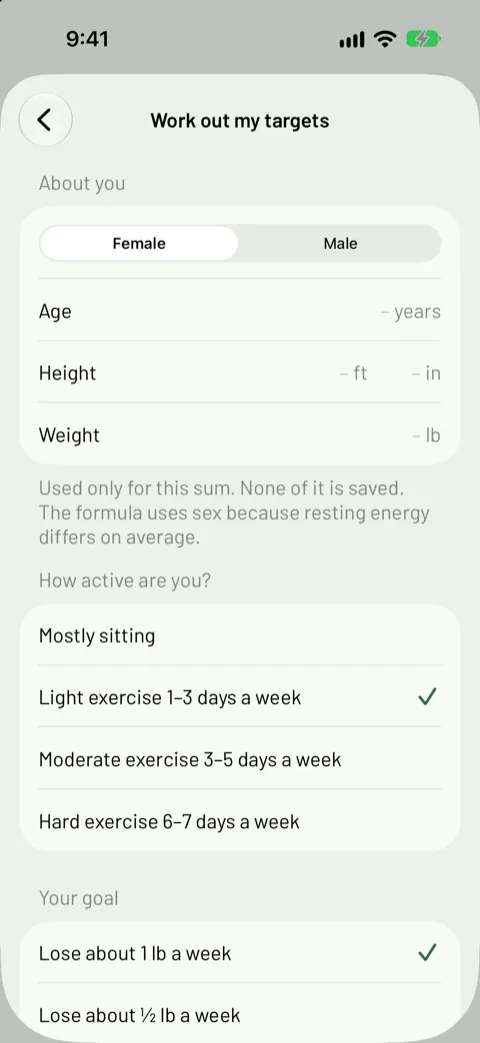
Your targets are a daily budget: calories, plus grams of protein, carbs and fat. Type in your own, or tap Work out my targets and answer a few questions: sex, age, height, weight, how active you are and your goal.

The app uses a standard formula (Mifflin–St Jeor). Your answers are used for the sum and never saved; only the targets are.

It won’t suggest less than 1,200 calories a day for women or 1,500 for men. If you’re pregnant, have a medical condition or a history of disordered eating, talk to a doctor or dietitian first.

Change them any time in Settings → Daily targets. Past days keep the targets they had.

The Work out my targets screen: female or male, age, height and weight, a note that none of it is saved, then how active you are and your goal, such as lose about 1 lb a week.

Step 5

Choose a model. Watch the cost.

Anthropic offers several Claude models. The app picks its newest Sonnet and marks it Recommended: it estimates well at a moderate price. Larger models cost more per entry; smaller ones cost less. Change it in Settings → Model.

Usage and cost shows this month, last month and all time: messages, cost per message and an estimated total. A typical entry costs less than a cent to a couple of cents, and a photo a little more. Your actual bill is always in your Anthropic account.

The Model screen: Claude Sonnet 5.5 (recommended) is selected, with Haiku 5.5, Opus 5.5 and Fable 5.1 as other choices, a note that larger models cost more each time you log, and a link to older models.
The Usage and cost screen for this month: estimated cost $0.075, 8 messages, $0.009 per message, 46,406 tokens, 52% read from cache.

Part 2 · Every day

Day to day.

Tell the Log tab what you ate, the way you’d tell a friend. Numbers you give are logged straight away. Anything the AI has to estimate waits for your OK.

Logging

Say what you ate.

Type it, or tap the microphone on the keyboard and say it. “Chicken burrito and chips for lunch” is enough. The more you say about portions, the closer the estimate.

Name the meal if you like. If you don’t, the app goes by the clock: breakfast until 10:30 am, lunch until 3 pm, dinner from 5 to 9 pm, and a snack otherwise. Everything in one message counts as one meal unless you say otherwise.

Forgot something? Say when: “yesterday’s lunch was a turkey sandwich”.

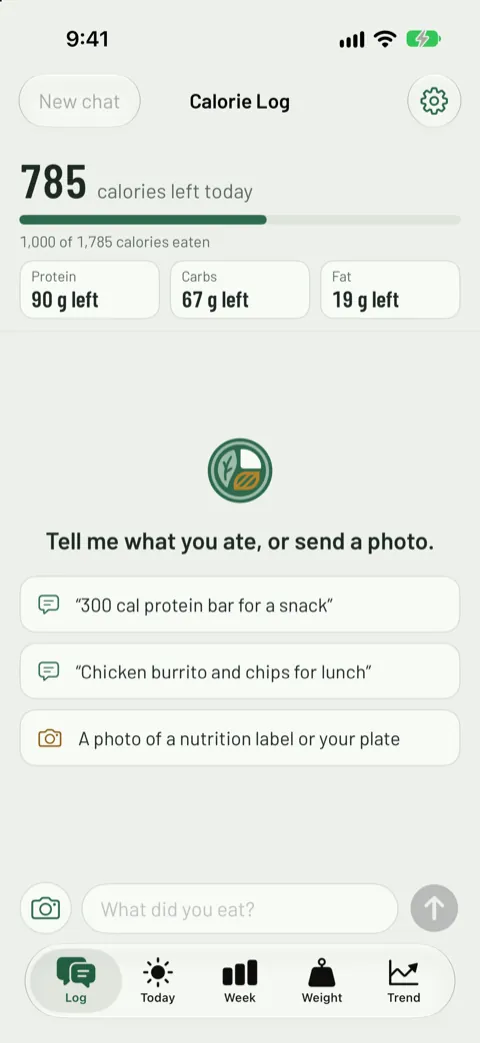
The Log tab before anything is logged in this chat: 785 calories left today, grams of protein, carbs and fat left, and three examples to tap: a 300 cal protein bar, a chicken burrito and chips, and a photo of a label or plate.

Labels

Numbers you give are logged at once.

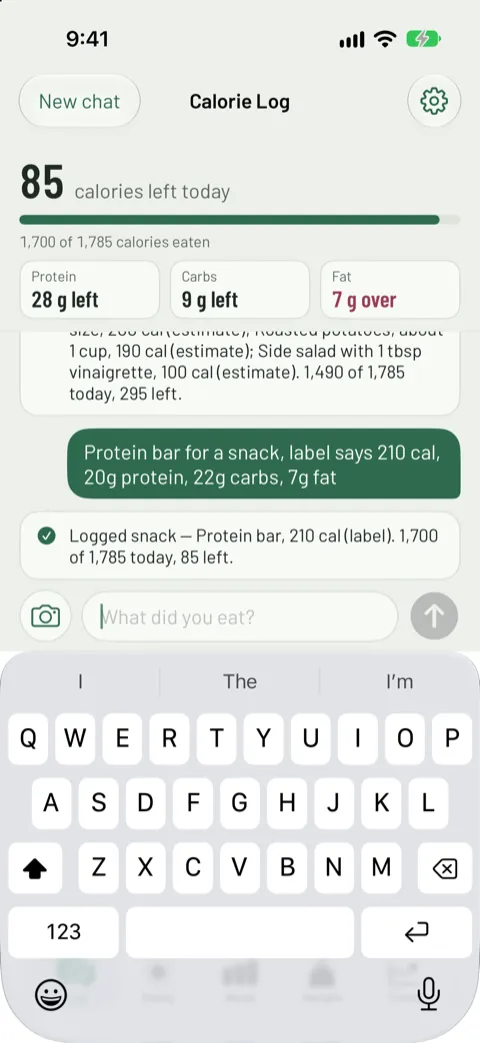
Read the calories off a label or a menu, and the entry is saved straight away, marked Label. A line under your message confirms it, with your running total.

Give protein, carbs and fat too for the most exact log. If you give only calories, the AI fills in macros that fit them.

  • LabelNumbers you gave or that were read off a label.
  • EstimateThe AI’s estimate from your description.
  • Photo estimateThe AI’s estimate from a photo of your plate.
A message reading "Protein bar for a snack, label says 210 cal, 20g protein, 22g carbs, 7g fat", answered with "Logged snack, Protein bar, 210 cal (label). 1,700 of 1,785 today, 85 left."

Estimates

Estimates wait for your OK.

Describe food without numbers and the AI may ask a question or two, such as the portion size or whether there was dressing. Then it shows an estimate card, item by item.

Accept logs it. Edit lets you change the meal, the day or any number first. The × dismisses it, and nothing is saved.

Edited numbers are still marked as an estimate. Protein, carbs and fat must add up to the calories, so if you change only the calories, the app offers to scale the three to match.

The Edit estimate sheet: the meal for all three items, then the first item, a grilled chicken breast, with its day, 260 calories, 48 g protein and 6 g fat, and a note that edited numbers are still an estimate.
An estimate card for dinner: grilled chicken breast 260 cal, roasted potatoes 220 cal and side salad with a little vinaigrette 90 cal, total 570 cal, with Accept and Edit buttons.

Photos

Snap a label or your plate.

  • A nutrition labelTap the camera beside the message field and photograph the label. The numbers are read off it and logged as Label. Add how much you had if it wasn’t one serving.
  • Your platePhotograph your meal and the AI estimates it, marked Photo estimate. It waits for your OK like any other estimate. A few words help: “half of this”, “with butter”.
  • Never keptUp to three photos a message. Each is shrunk and stripped of its location before it goes to Anthropic, and the app doesn’t save it.
Two photos sent together, the front of a frozen meal box and its Nutrition Facts panel, with "Lunch today, ate the whole box". The app logs it at once: Trader Joe's Vegan Thai Green Curry, 470 cal (label), 255 calories over for the day.
A photo of a salad with the corner of a sandwich, sent with "Lunch yesterday". The app asks what the sandwich was, then shows a Photo estimate card for Friday's lunch: BLT on grilled sourdough 450 cal and side salad 120 cal, total 570 cal, with Accept and Edit.

Corrections

Fix or delete an entry.

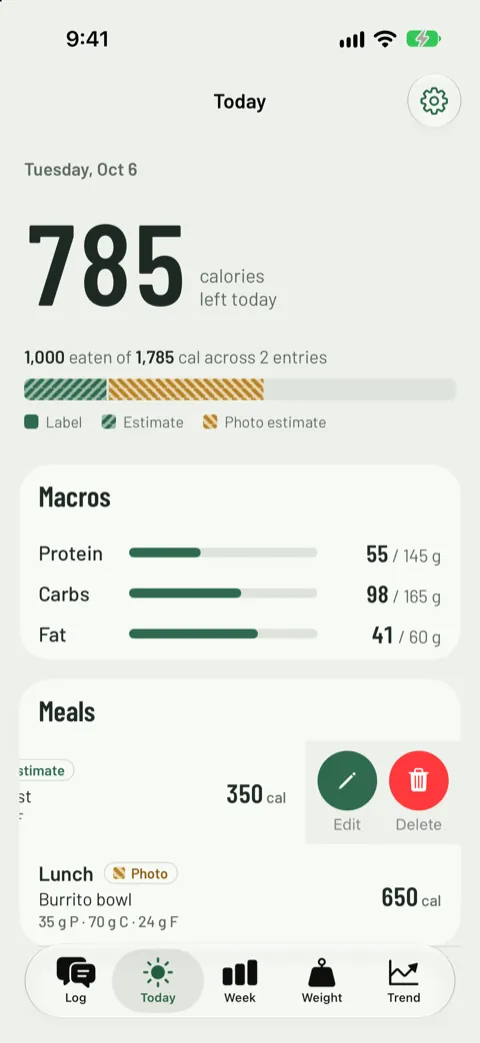
On the Today tab, swipe left on an entry under Meals, then tap Edit or Delete. Edit changes the description, meal, day and numbers.

Each meal can be edited for 14 days. After that it’s folded into that day’s totals, which are kept. You can make the window anything from 7 to 90 days in Settings.

The Today tab with a meal swiped to the left, showing Edit and Delete buttons.

Shortcuts

Save your usual meals.

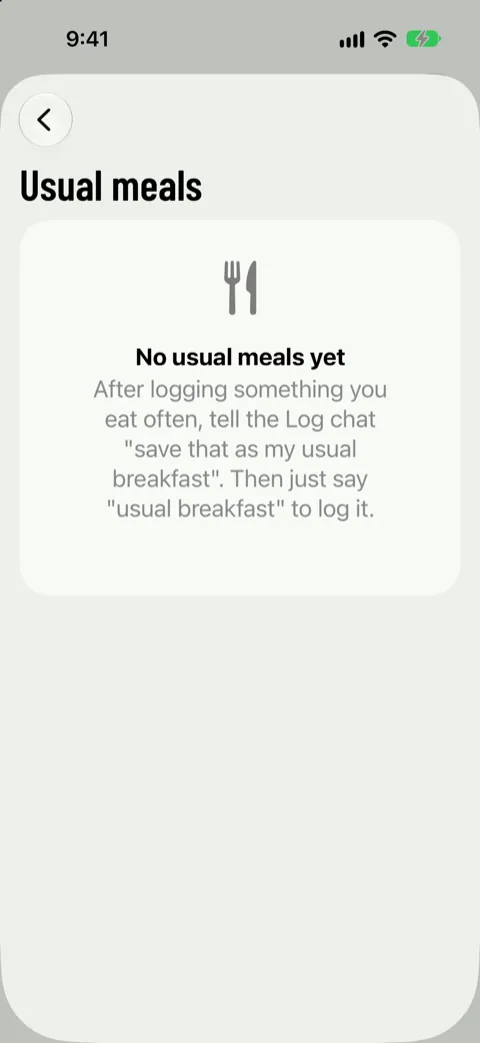
Eat the same breakfast most days? After logging it, tell the chat “save that as my usual breakfast”. From then on, “usual breakfast” logs it with the same numbers.

Manage them in Settings → Usual meals: tap one to rename it or change its numbers, or swipe to delete it. Past entries never change.

The Usual meals screen with none saved yet, explaining: after logging something you eat often, tell the Log chat "save that as my usual breakfast", then just say "usual breakfast" to log it.

Weighing in

Weigh in most mornings.

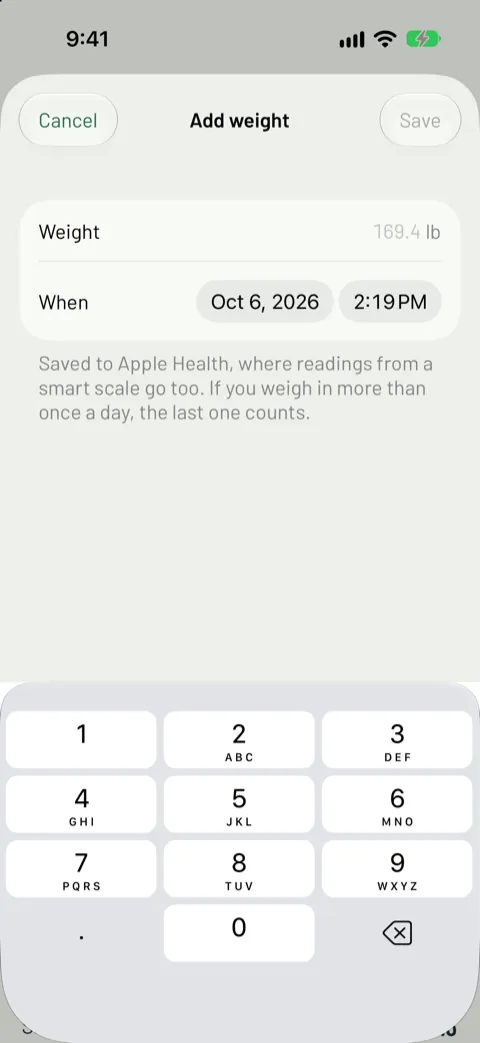
On the Weight tab, tap Add weight. It’s saved to Apple Health. Have a smart scale that writes to Health? Connect Apple Health once (on the Weight tab or in Settings) and its readings arrive on their own.

If you weigh in more than once a day, the last reading counts. Daily weight jumps around with water and salt, so the app draws a 7-day average through it.

The Add weight sheet: a weight in pounds and when it was taken, with a note that it's saved to Apple Health and that the last reading of the day counts.
  • Ask what’s left

    “Calories left?” or “how am I doing?” is answered on your iPhone, instantly. No AI, no cost, and it works without a key.

  • Start a new chat

    Tap New chat when you change topic. The AI stops seeing the messages above, which keeps each message short and cheap. They stay on screen.

  • Ask anything

    “What could I eat to hit my protein?” goes to the AI like any other message. Treat the answer as a starting point, not medical advice.

  • Get a nudge

    Turn on Daily reminder in Settings and the app reminds you at 5 pm, or a time you pick, but only on days you haven’t logged anything yet. It’s off until you choose it, and it runs on your iPhone, with no server.

Part 3 · Week by week

Reading your progress.

Four tabs, from today to the last four weeks. Each one is honest about what it knows: estimates look different from labels, and a missing day is a gap, not a zero.

  • Today

    Calories left, in big numbers. The bar shows how much came from labels, estimates and photo estimates. Below are the macro bars and the day’s meals.

    The Today screen: 785 calories left today, a bar split into label, estimate and photo estimate, and protein, carbs and fat bars.
  • Week

    Seven days against your target line. A day over target turns plum. Tap a day for its detail. The averages leave out today and days you didn’t log.

    The Week screen: seven days of stacked calorie bars against a target line, with one day over target and one day with no data.
  • Weight

    A dot for each weigh-in and a line for the 7-day average. Trust the line, not the dot: one salty dinner can add a pound of water overnight.

    The Weight screen: 169.4 lb, down 4.1 lb since September 9, with daily dots and a 7-day average line.
  • Trend

    Unlocks after 21 days of logging and 12 weigh-ins. It sets four weeks of eating beside your weight, and works out roughly what you burn in a day.

    The Trend screen: 28 days of calories above a chart of the weight average.

Your data stays yours. There’s no account and no sync: your log lives on this iPhone. Daily totals are kept until you choose otherwise, and nothing is deleted without asking. Settings → Export data saves it all as spreadsheet files (CSV).

Still stuck?

We’re here to help.

If something in the app doesn’t match these steps, or you can’t find an answer, get in touch.